
Watch out for this chatter...

Status
Not open for further replies.

RosieGum

Member
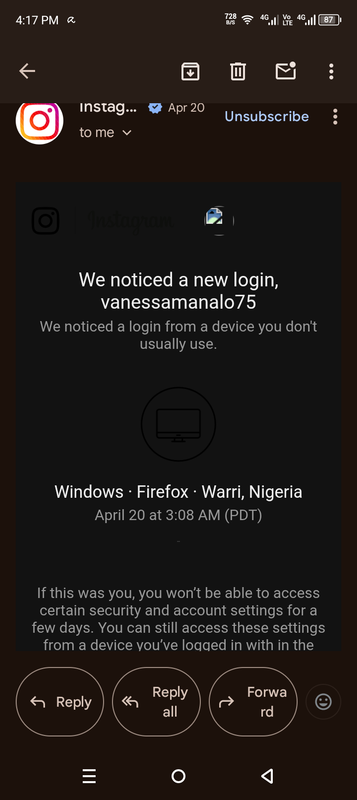
A few weeks ago, I recently chat on General Chat until someone by username Williams Gonzalez PM me. He said that he's from Puerto Rico, working in US. We had a friendly conversation until he ask my one of my socials. But then he also ask my password. Then something happened, I received an email from my social that someone from Nigeria has added me. I said wait a minute, how come someone added me from nowhere(in Nigeria)? I even perceive that his pics are from stock photos. I think this person is a scammer from Nigeria pretending as a white guy. Here's the pics for proof

https://postimg.cc/K4g7tjdw (this is username; I immediately blocked him)
 
@TheLeigh

As general advice: anyone asking for your passwords, login access tokens, PINs, OTPs (One Time Passwords), 2FA (2 factor authentication) codes, api keys, etc is not to be trusted under ANY CIRCUMSTANCE.

Consider that email you got a confirmation that your account is compromised and take immediate actions to re-secure the account. This means changing your password and any accounts that use a similar password. This is NOT them adding you, they've attempted to LOG INTO your account. You only have a few days until they can do an account take over.
 
A few weeks ago, I recently chat on General Chat until someone by username Williams Gonzalez PM me. He said that he's from Puerto Rico, working in US. We had a friendly conversation until he ask my one of my socials. But then he also ask my password. Then something happened, I received an email from my social that someone from Nigeria has added me. I said wait a minute, how come someone added me from nowhere(in Nigeria)? I even perceive that his pics are from stock photos. I think this person is a scammer from Nigeria pretending as a white guy. Here's the pics for proof

https://postimg.cc/K4g7tjdw (this is username; I immediately blocked him)

I’m confused, so you have a random guy on the internet your log in details?
 
@TheLeigh

As general advice: anyone asking for your passwords, login access tokens, PINs, OTPs (One Time Passwords), 2FA (2 factor authentication) codes, api keys, etc is not to be trusted under ANY CIRCUMSTANCE.

Consider that email you got a confirmation that your account is compromised and take immediate actions to re-secure the account. This means changing your password and any accounts that use a similar password. This is NOT them adding you, they've attempted to LOG INTO your account. You only have a few days until they can do an account take over.
Take note of this excellent advice ^^^^^

I'd also set up MFA with an authenticator app as well. Even if they manage to guess your password without the actual app they're helpless. Also if you use the same password across multiple apps and sites then change those as well and get into the habit of a different password for each site. Use a password manager to keep a record of them (KeePass XC is brilliant and free).

If you want to know why, look up credential stuffing.
 
Hi @RosieGum -

Thank you for reaching out and bringing this to our attention. I’ll review everything and take the necessary steps from here.

In the meantime, please follow the advice shared by @LostCause. and @emileh, and avoid sharing any personal or sensitive information with anyone online moving forward.
 
Status
Not open for further replies.
Top